ISO 27001 · Clause 6.1.3 d)
The ISO 27001 Statement of Applicability
The document an auditor asks for first, and the index they navigate the rest of your ISMS by. How to build one yourself: what each of the 11 parts has to record, the 3 justifications people reliably get wrong, and the 7 questions it has to survive.
Last updated
Rather not make 93 decisions by hand? Have it assembled from your scope instead - the signup credits cover your first document. Card required; no charge today.
The guide
How to build a Statement of Applicability, part by part
An SoA is a register, not a policy. Nothing in it is prose you have to phrase well - it is 93 decisions, each with a reason, each pointing at the document that carries it. These are the 11 parts it has to have, and what an auditor is actually checking in each.
- 11
- sections
- 3
- with real wording
- 7
- auditor requests
- 7
- failure modes
-
Document control and approval
What it must contain
Document reference, version, owner, effective date and next review, plus who approved this version and when.
What the auditor checks
That the copy in front of them is the current, approved one. An SoA circulating as an undated spreadsheet cannot be shown to be the version the decisions were made against.
-
Scope statement, or a reference to it
What it must contain
The boundary the applicability decisions were made inside - the same scope your certificate will carry, not a restatement of it.
What the auditor checks
That your exclusions follow from the scope. Almost every defensible exclusion traces back to a boundary: no data centre, no in-house development, no cardholder data.
Wording that works Scope: the design, hosting and support of the [product] platform and the corporate systems supporting it, delivered from [location] and cloud infrastructure in [region].
It names what is in, where it runs and who runs it - so a physical-security exclusion later in the register is already justified by this sentence.
-
The full control inventory
What it must contain
Every one of the 93 Annex A controls of the 2022 edition, listed whether or not it applies to you.
What the auditor checks
Completeness, first and fastest. A register that lists only the controls you implement is not a Statement of Applicability - the excluded ones are precisely what it exists to record.
-
The applicability decision
What it must contain
Included or excluded, for each control, decided from your risk assessment and scope rather than from what you happen to have already written.
What the auditor checks
Whether the decision was made or inherited. A register where every control is included reads as a decision nobody took, and invites them to test several at random.
-
Justification for inclusion
What it must contain
The reason the control applies - normally the risk it treats or the obligation that requires it.
What the auditor checks
That the reason is about your business. 'Best practice' and 'required by ISO 27001' are the two answers that tell an auditor nothing, because they would be true for any organization.
Wording that works Included: all customer records are held in cloud systems accessed by role, so access rights are a primary control over the confidentiality risk in the register (R-04).
It names the asset, the mechanism and the risk it traces to, so the row survives being read on its own.
-
Justification for exclusion
What it must contain
Why the control does not apply, stated as a fact about your organisation and traceable to the scope or the risk assessment.
What the auditor checks
This is the single most-tested field in the document. An exclusion with a blank reason, or the words 'not applicable' repeated, is one of the most common findings raised against an SoA.
Wording that works Excluded: [Organization] operates no owned data centre or server room, and the [location] office holds no production systems, so physical monitoring of such facilities does not apply.
It states the fact, names where that fact holds, and ties back to the scope - which is what makes it defensible rather than an assertion.
-
Implementation reference
What it must contain
For every included control, the policy, procedure or record that implements it, named well enough to be retrieved.
What the auditor checks
They will pick two or three rows and ask for exactly those documents. This column is how the SoA becomes the index an auditor navigates your ISMS by.
-
Control owner
What it must contain
The role accountable for each included control - a role, not a person, so it survives someone leaving.
What the auditor checks
That the owner is plausible and reachable. A register where one name owns all 93 controls does not describe a management system anyone operates.
-
Implementation status
What it must contain
Whether the control is implemented, partially implemented or planned, with a date where it is not yet done.
What the auditor checks
Honesty, and that planned work has an owner and a date. Partial implementation stated plainly is normal at a first audit; partial implementation presented as complete is a finding.
-
Link to the risk assessment and treatment plan
What it must contain
A reference tying decisions back to the risks that drove them, so the SoA and the risk treatment plan tell the same story.
What the auditor checks
That the two documents agree. Clause 6.1.3 expects the SoA to follow from risk treatment, so a control treated in the plan but excluded in the register is a direct contradiction.
-
Version history and review cadence
What it must contain
What changed, when and why - and the commitment to review the register at least annually and whenever scope, risk or controls change.
What the auditor checks
Whether it is maintained or was written once for the certificate. A register whose last change predates a restructure, a migration or a new product line has stopped describing the organisation.
Get this as an editable document - your first document is free Card required; no charge today.
At audit
What an auditor asks of your SoA
The SoA is usually the first document requested and the one most sampled from, because every other document in the set is reachable through it. These 7 questions cover most of what it is put through.
- Show me your Statement of Applicability.
-
Satisfies A single current version, approved, dated and covering every Annex A control - produced without assembling it from several spreadsheets.
Fails Several partial copies, or one nobody can say is the approved version.
- Why is this control excluded?
-
Satisfies A reason that is a fact about your organisation and follows from the scope, phrased so it stands up without you in the room.
Fails 'Not applicable', a blank cell, or a reason that would be equally true of any company.
- Show me the document that implements this control.
-
Satisfies The document named in the row, saying what the row claims it says, at the version the register cites.
Fails A document that does not exist yet, or one that turns out to cover something else.
- Does this match your risk treatment plan?
-
Satisfies The same decisions in both, with the register referencing the risks that drove them.
Fails A control treated in the plan and excluded in the register, or the reverse.
- Who approved this, and when?
-
Satisfies A named approver with a role and a date, on the current version, at a level with authority over the scope.
Fails An approval on an old version, or none at all.
- When did you last review it, and what changed?
-
Satisfies A version history showing review at least annually, plus changes made after scope, risk or control changes.
Fails A register unchanged since certification while the business demonstrably moved.
- You have marked this implemented - show me.
-
Satisfies The evidence that control produces: a ticket, a completed review, a configuration, a record.
Fails A policy that says the control happens, with nothing showing that it did.
Failure modes
Where Statements of Applicability go wrong
Almost none of these are about the controls. They are about decisions nobody recorded the reason for, and a register that stopped tracking the business.
-
Marking every control applicable to avoid having to justify anything
It looks safe and does the opposite: you now owe evidence for all 93. Auditors read a fully-included register as a decision nobody made, and test it. Excluding a control properly is less work than implementing one you do not need.
-
Writing 'not applicable' as the justification for exclusion
That restates the decision instead of supporting it, and it is the most common finding raised against an SoA. Give the fact underneath it - no owned facility, no in-house development, no card data - and tie it to the scope.
-
Letting the SoA and the risk treatment plan disagree
They are checked against each other. A control treated in the plan but excluded in the register, or vice versa, shows the two were maintained separately. Update both from the same review or generate them together.
-
Citing documents that do not exist yet
The implementation column is the one an auditor samples. Naming a policy you intend to write turns a paperwork question into a credibility one. Mark the control planned, with an owner and a date, until the document is real.
-
Inheriting a toolkit's justifications wholesale
Generic justifications are recognisable on sight, and they are the fastest way to convert a document review into a deep audit. The reason has to name your systems, your data or your obligations.
-
Still working from the 2013 control set
The 2013 edition had 114 controls in 14 clauses; the 2022 edition has 93 across four themes. A register with the old structure signals the whole set was never migrated, and every mapping downstream is then suspect.
-
Treating it as a certification artefact rather than a live register
The SoA is the one document that should change when the business does - a new product, a migration, an acquired team. Reviewed only before an audit, it stops being the index of your ISMS and becomes a snapshot of the year you were certified.
Where it sits
The SoA and the rest of ISO 27001
ISO/IEC 27001:2022 clause 6.1.3 d) requires a documented Statement of Applicability. It is not a policy and not a risk register - it is the index that ties your risk decisions to the controls and to the documents that carry them. Everything else answers to it: a control marked applicable needs a policy, procedure or record behind it, and a control excluded needs a reason that holds.
You can see every control it has to account for on our ISO 27001 controls list - 93 controls across 4 themes in the 2022 edition. If you already hold some policies and want to size the work first, an ISO 27001 gap analysis shows which controls you already meet before you write anything. And the register is only useful if the documents it points at exist: see the full ISO 27001 documentation set, each document mapped to the clause or control it satisfies.
See the real output
What PolicyMint generates
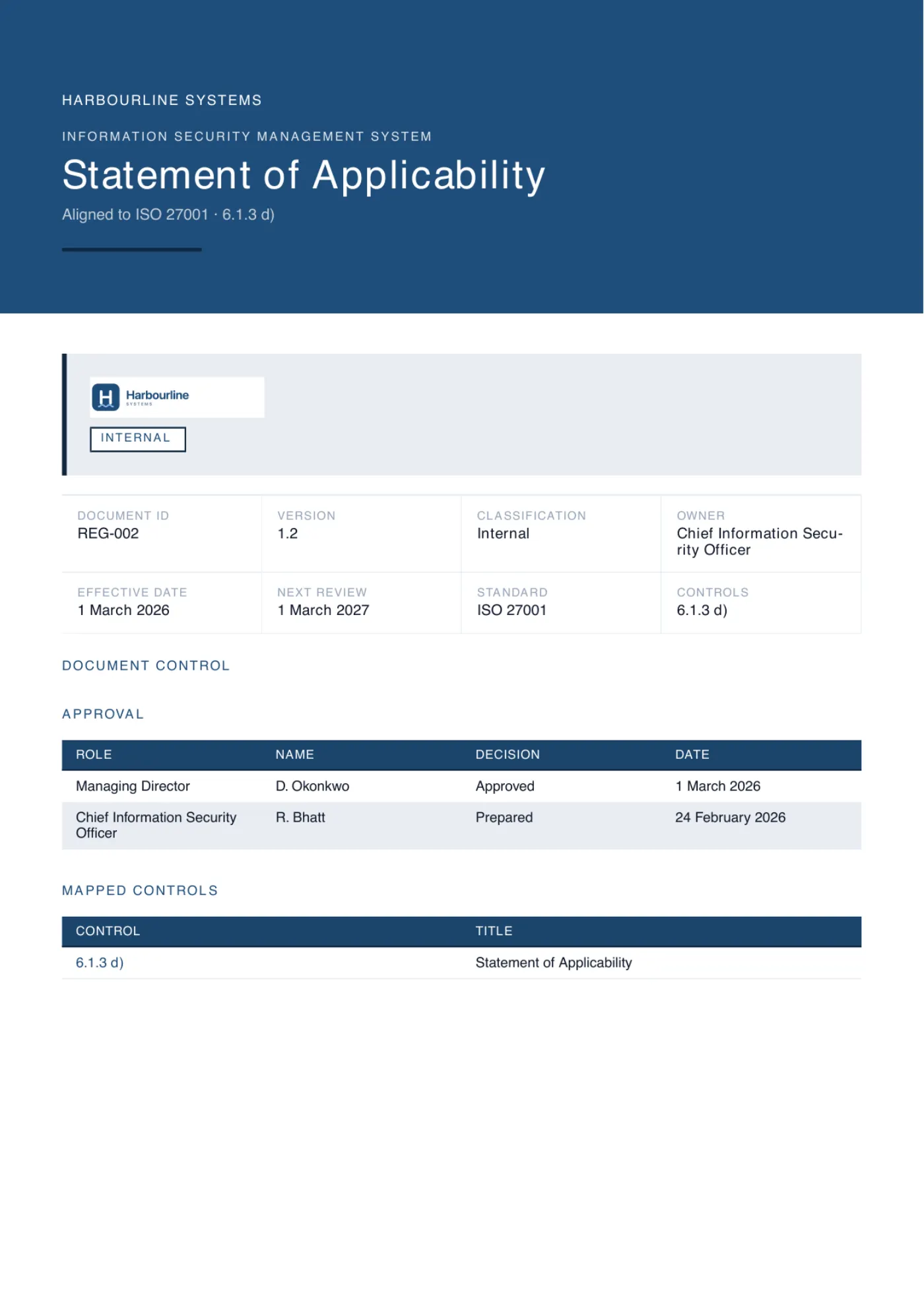
The register above, assembled from your scope and risk profile: every control listed, each decision justified against your business rather than best practice, each included control citing the document in your set that satisfies it, and anything it cannot know flagged instead of invented. It carries your branding and exports to Word, PDF or Excel. The cover in the hero and the control table below are exactly that output, generated for an example company.
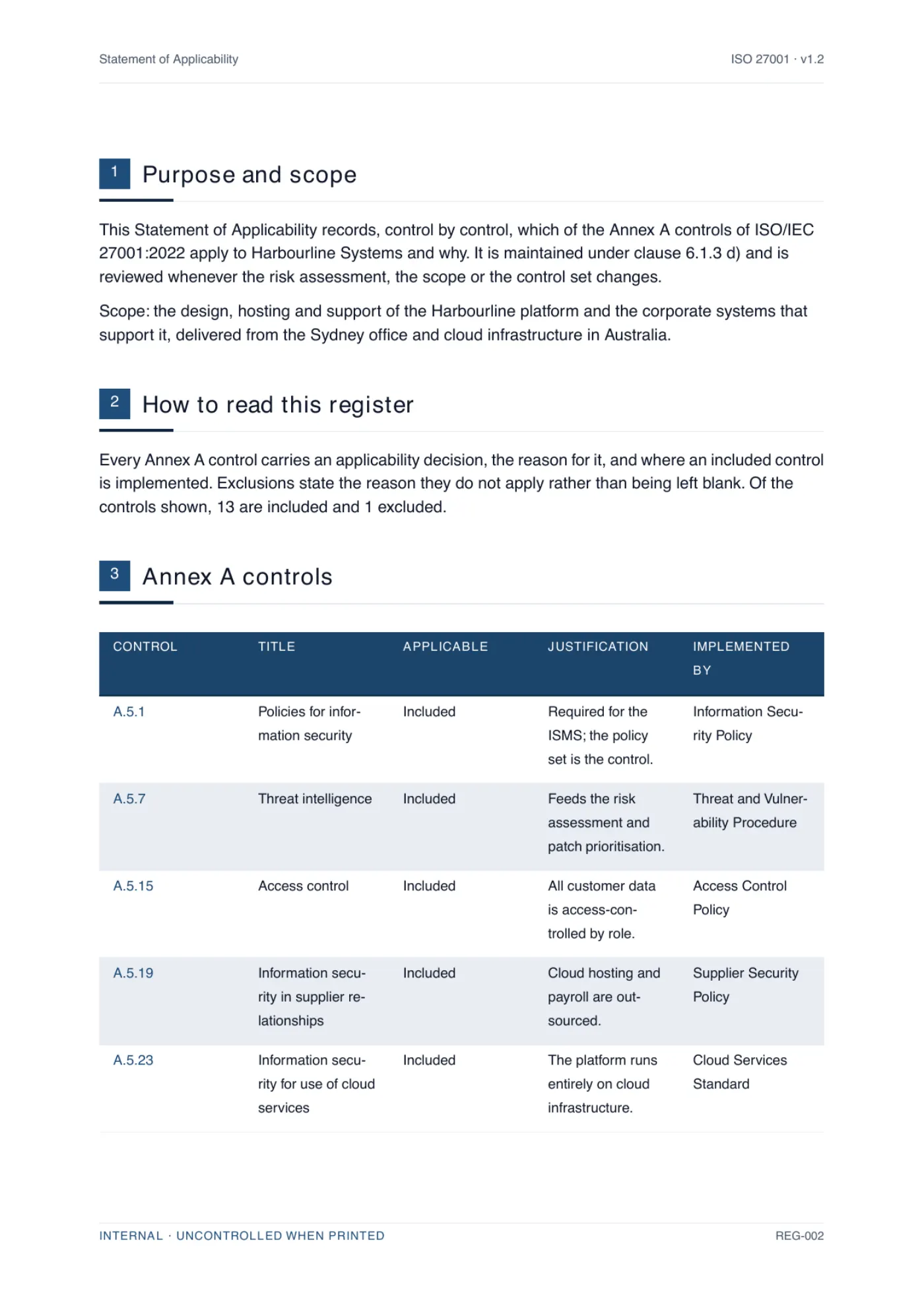
Where the guide says [role] or [system], the document says yours; where PolicyMint cannot know a fact, it asks rather than guesses.

The one fact this document could not know stays highlighted in the document and the export. The review explains what is needed and writes your answer in. Nothing is invented. Fictional demo data.
Side by side
Building it yourself vs generating it
Both routes end with the same register. What differs is how many of the 93 decisions inside it you make alone, and whether anything checks them before an auditor does.
Scroll the table sideways to compare both routes.
| Dimension | Building it yourself | Generating it with PolicyMint |
|---|---|---|
| Getting the control list | Transcribe all 93 controls of the 2022 edition, and check you have not carried over the 2013 structure. | The current control set is already there, every control listed whether it applies or not. |
| Deciding applicability | 93 include-or-exclude calls, each traced back to your scope and risk assessment. | Decided from the scope and risk profile you gave, with anything it cannot know flagged rather than guessed. |
| Writing justifications | The slowest part: a defensible sentence per control, and exclusions are the ones that get tested. | Written from your business facts, naming your systems and obligations rather than 'best practice'. |
| Pointing at implementing documents | Cross-reference every included control against a document set you are still writing, and keep the references true as it changes. | Each row cites the document in your set that satisfies it, because both are generated together. |
| Keeping it consistent | Reconcile the register against the risk treatment plan by hand, every time either one moves. | The register and the documents it references stay in step by construction. |
| Time and cost | Days of work, plus the rework when an auditor tests an exclusion nobody justified. | Minutes, and your first document is free. The whole set is one prepaid pack. |
- ISO 27001 documents
-
36
ISO 27001 documents
tiered by what you actually need
- ISO 42001 documents
-
21
ISO 42001 documents
for AI management systems
- Clauses and controls mapped
-
182
Clauses and controls mapped
every document cites the ones it satisfies
- Verifiers per section
-
3
Verifiers per section
on a different model to the writer
Statement of Applicability FAQ
The questions people ask
Including whether it is mandatory, how it differs from a risk treatment plan, who owns it, and what a full set costs.
Is the Statement of Applicability mandatory for ISO 27001?
Yes. ISO/IEC 27001:2022 clause 6.1.3 d) requires a documented Statement of Applicability. It is one of the few documents the standard names explicitly, and an auditor will ask for it first, because it is the map to everything else.
What is the difference between the SoA and the risk treatment plan?
The risk treatment plan says what you will do about each risk and by when. The Statement of Applicability records, for every Annex A control, whether it applies, the justification, and whether it is implemented. The treatment plan drives change; the SoA is the standing record of control decisions.
How many controls does the ISO 27001 SoA cover?
All 93 Annex A controls in the 2022 edition. The SoA lists every one and records a decision against it - included or excluded - with a reason, so nothing is left ambiguous.
Can a control be excluded from the SoA?
Yes, if it genuinely does not apply to your scope - for example a control about software development when you build nothing. The SoA must state why each excluded control is not applicable; an exclusion without a defensible reason is a common audit finding.
How often should the Statement of Applicability be reviewed?
At least annually, and whenever the scope, the risk assessment or the control set changes - a restructure, a migration, a new product line. The SoA is a live register, not a certification artefact: its version history should show what changed, when and why. A register whose last change predates a known change to the business reads to an auditor as one that has stopped describing it.
Who owns and approves the Statement of Applicability?
The document is owned by whoever runs the ISMS, typically the information security manager or CISO, and approved by management at a level that can commit the organization to the decisions in it, with the version, date and approver recorded in the document control block. Each included control also carries its own owner: the role accountable for it, named as a role rather than a person so it survives someone leaving. A register where one name owns all 93 controls does not describe a management system anyone operates.
How much does a full ISO 27001 document set cost?
PolicyMint's Full ISMS / AIMS pack is a one-time A$350US$229£179€209 including GST and covers a complete certifiable ISO 27001 set of 36 finished documents, or a complete ISO 42001 set of 21. Each document is drafted from your own business profile, checked by three independent verifiers before you see it, and exported in your branding as Word, PDF and Excel. There is no subscription and credits are valid for 18 months. That is about A$8.75US$5.73£4.48€5.23 per finished document. For comparison, Advisera publicly lists about A$1,300 (US$897)US$897about £660 (US$897)about €780 (US$897) one-time for pre-written templates you complete with its AI copilot, and GRC Solutions (formerly IT Governance) about A$950 (£495)about US$670 (£495)£495about €580 (£495) excl. VAT. Certification itself is a separate cost, paid to an auditor and a certification body.
Ready when you are
Stop staring at an empty document set
Set up your business once. Get the documents you actually need, written for how you really operate, in your branding, checked before you see them.
Your first document is on us. We ask for a card when you download it and you are not charged for it, and there is no sales call.