ISO/IEC 27001 · Staff-facing policy
Acceptable Use Policy Template
A working guide to writing one yourself: every section of the document in order, what each has to say and why an auditor cares, real wording for the handful of clauses people get wrong, and the failure modes that turn a policy into a finding. Write it from this page, or have PolicyMint draft this one document from your business profile - the first one is free.
Card required; no charge today.
The guide
How to write an acceptable use policy
- 15
- sections the document needs
- 4
- wordings people reliably get wrong
- 7
- things an auditor asks to see
- a day
- to write it yourself
An acceptable use policy (AUP) is the staff-facing document that says how company systems, accounts, devices and information may and may not be used. It is usually the one security policy every employee reads, when they join. This page walks through all fifteen sections in order, with real wording for the clauses people get wrong.
Write it in this order - all fifteen sections, three pages, plain sentences - because a clause you will not enforce costs you the clauses you would have. The four sections that fail under pressure carry real wording, and why it holds up.
Get this as an editable Word document - your first document is free Card required; no charge today.
-
Purpose
What it must contain
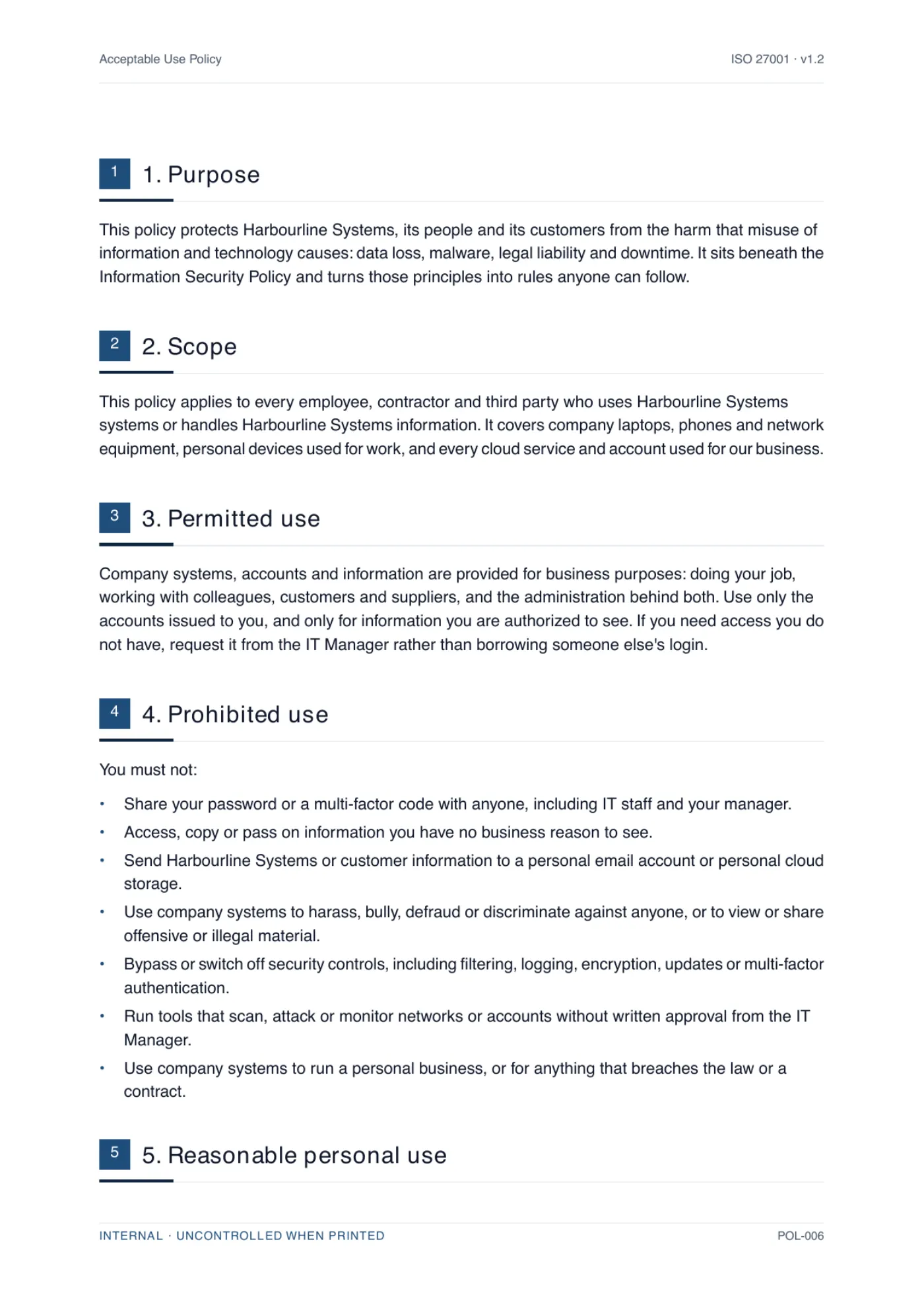
Two or three sentences on why the rules exist and what they prevent - data loss, malware, legal liability, downtime - and a line placing this document beneath your information security policy.
What the auditor checks
Shows the policy is part of a system rather than a stray file someone wrote once. A purpose that cites no parent policy suggests there is no parent policy.
-
Scope
What it must contain
Who it binds and what it reaches: employees, contractors and third parties; company laptops, phones and network gear; personal devices used for work; every cloud service and account used for the business.
What the auditor checks
Scope gaps are where contractors and personal devices quietly fall outside the ISMS. If your scope statement covers a team the policy does not, that mismatch is the finding.
-
Permitted use
What it must contain
What the systems are actually for, that people use only the accounts issued to them, and the route to request access they do not have instead of borrowing a colleague's login.
What the auditor checks
Read against your access control policy. Shared logins are the classic contradiction: banned here, alive in the admin console.
-
Prohibited use
What it must contain
A short, specific list of things that are never acceptable. Password and MFA-code sharing, snooping, moving company data to personal accounts, harassment, disabling security controls, unapproved scanning tools, running a side business on company systems.
What the auditor checks
Checked for enforceability, not length. Any prohibition you cannot detect or will not act on weakens the ones you can.
-
Reasonable personal use
What it must contain
A plain answer to the question everyone has, with a limit a manager can apply, plus a warning that personal material on company systems can still be seen during support, backup or an investigation.
What the auditor checks
Mostly wants a decision on record. A tribunal or regulator wants it far more than the auditor does, which is why the warning sentence belongs here.
Wording that works Occasional personal use of email, the internet and company devices is allowed, as long as it is modest, does not interfere with your work and breaks no other rule here. Anything on company systems, including personal material, may be seen during support, backup or an investigation.
It answers the question rather than dodging it, and the limit is one a manager can apply without a policy in hand. The second sentence is doing quiet work: it is the notice that makes the monitoring clause survive a challenge later. The usual failure here is a total ban that nobody intends to enforce, which teaches people that the rest of the document is optional too.
-
Accounts, passwords and multi-factor authentication
What it must contain
Unique passphrases stored in the password manager you actually license, no reuse on personal services, MFA turned on, deny any prompt you did not trigger and report it, lock the screen when you step away.
What the auditor checks
Reconciled against the real configuration: your tenant's MFA coverage, the password manager rollout, the screen-lock policy your endpoints enforce.
-
Devices, including personal devices (BYOD)
What it must contain
The settings company devices must keep - disk encryption, screen lock, automatic updates, endpoint protection - and the equivalent minimum for a personal device, including your right to remove company data from it. Same-day reporting for a lost or stolen device.
What the auditor checks
The natural home of A.8.1, user endpoint devices. Expect to be asked for the enrollment evidence and for the sentence where the employee agreed to the removal of company data.
Wording that works A personal phone or computer used for work needs a screen lock and current updates, work must stay inside the approved apps, and you must allow us to remove [Organization] data from it when you leave or if it is lost.
Consent to remove company data is given in advance, in the document people sign, which is the only time it is easy to get. Note what it does not say: it removes company data, not the device. Promising a full wipe of a personal phone is a promise you will regret the first time you make good on it.
-
Software, cloud services and shadow IT
What it must contain
Only approved and licensed software and services, and the approval route to request a new one before any company or customer information goes into it - free tools and browser extensions included.
What the auditor checks
Sampled hard. Someone will pick a tool that is obviously in use and ask to see its approval, so name a role that really does the approving.
-
Removable media and printing
What it must contain
Whether USB drives and portable disks are allowed at all; if they are, that they must be issued by you, encrypted, approved, and erased or destroyed at the end of the task. Never plug in a drive you were given or found. How confidential paper is collected and destroyed.
What the auditor checks
Compared with the technical control. A written ban with open USB ports reads as a policy written to impress rather than to run.
-
Email, messaging and phishing
What it must contain
How to recognize a suspicious message, what not to click, how to verify through a channel you already trust, exactly where to report, and an explicit promise that reporting in good faith is never punished.
What the auditor checks
Read alongside your awareness training and your reporting numbers. Both are A.6.3 evidence, and both are checked more often than the policy text.
Wording that works Report suspected phishing to [report button or address] even if you already clicked: telling us early limits the damage, and nobody is disciplined for reporting in good faith.
One sentence carries a named destination and an explicit amnesty. Without the amnesty, the person who clicked stays quiet until the finance team notices, and you lose the hours that mattered. It also protects your numbers: a policy that punishes reporters produces suspiciously clean reporting statistics, and experienced auditors know what those mean.
-
Social media and public comment
What it must contain
Who may speak for the organization and who may not, what must never be posted - customer information, internal documents, system screenshots, anything under a contract or NDA - and that nobody responds publicly to a security incident or a media question.
What the auditor checks
Cross-checked against the communications step in your incident response plan. Two documents naming different spokespeople is an easy finding.
-
Monitoring and what you can expect
What it must contain
What you log and monitor, the legitimate purposes, who can see the results, and what happens to the personal information monitoring inevitably captures.
What the auditor checks
The auditor checks that people were told. Where the law requires prior notice, so does a regulator, and after the fact is too late.
Wording that works [Organization] logs and monitors the use of its systems - accounts, email, internet access, devices and cloud services - to keep them secure and available, to investigate incidents and suspected breaches, and to meet legal obligations. Monitoring is proportionate, and the results are seen only by [role] and anyone investigating a specific matter.
It names what is monitored, why, and who sees the output - and it does so before anyone is monitored rather than after something has gone wrong. This is the clause that gets picked apart when you rely on it in a disciplinary case, and several jurisdictions require you to give notice first. Rules on workplace monitoring differ by country and state, so check the local law before you finalize the wording.
-
Reporting problems
What it must contain
One named route and a timeframe, with concrete examples: a lost device, a link you should not have clicked, a password you may have exposed, a file sent to the wrong person. Say that people report their own mistakes as readily as attacks.
What the auditor checks
Matched against the incident register and the incident response plan. If the channel named here does not exist, or nothing ever arrives through it, the control is on paper only.
-
Breaches and consequences
What it must contain
The link into your disciplinary process, the contractual route for contractors and suppliers, referral to law enforcement for theft or fraud, and an exception route for rules that genuinely cannot be met.
What the auditor checks
Looks for the exception route to be real: risk-assessed, time-limited and recorded. Exceptions that are simply assumed are non-compliance with extra steps.
-
Acknowledgment, ownership and review
What it must contain
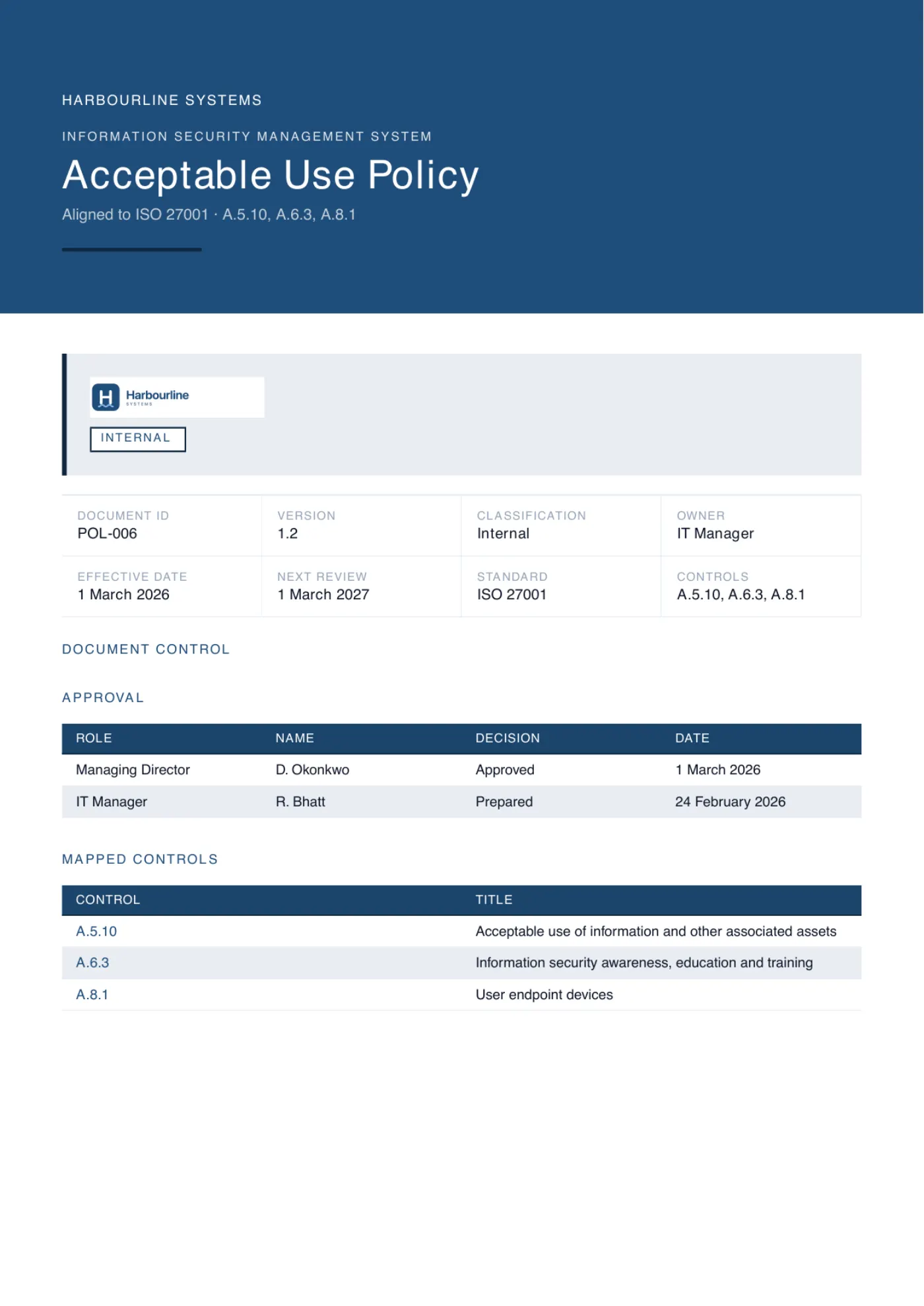
Everyone in scope confirms they have read and understood it when they join and at each annual refresher. Name the owner, the approver with their title, the approval date, the version, and the review cadence.
What the auditor checks
The clause tested hardest, because it is the one that generates evidence. Expect to be asked for the acknowledgment list and for a named recent joiner within it.
If the business runs on cloud services, the rules this section points at - who approves a new service, how it is configured, and how you would leave it - belong in their own document. The cloud security policy template is the guide to writing it.
AI tools deserve a mention here rather than a chapter. Treat a public assistant as an unapproved cloud service: fine once it is on your approved list, and otherwise governed by the shadow IT and confidentiality rules you have already written. One line in the software clause usually does it, along the lines of "do not paste customer or confidential information into an AI tool that has not been approved". If AI is central to how you work, or you are heading toward ISO 42001, those rules earn their own document instead - there is a guide to writing an AI policy for that.
Then do the part most organizations skip: communicate it. Get it approved by someone with the authority to approve it, give it a version number and a review date, issue it, and record who acknowledged it and when. A policy nobody has read is not a control, and at audit the evidence that people were told carries as much weight as the document itself.
Get this as an editable Word document - your first document is free Card required; no charge today.
At audit
What an auditor actually checks
Almost nobody fails on the wording. They fail on the evidence around it, and on the distance between what the document promises and what the business does. These are the questions that get asked, and what a clean answer looks like.
- Show me the current acceptable use policy.
-
Satisfies One version, with an owner, an approver named with their title, an approval date, a version number and a review date that has not passed.
Fails A header still reading Draft, or a review date from two years ago, fails before anyone reads a clause.
- Who has read it?
-
Satisfies An acknowledgment record covering everyone in scope with dates, including contractors and people who joined last month. This is the A.6.3 evidence, and it fails far more often than the document does.
- Take this person who joined in March.
-
Satisfies Their induction record: the policy issued, acknowledged, and the awareness training that went with it, all inside whatever timeframe you committed to in writing.
- Your policy says new software is approved by a named role. Show me the last approval.
-
Satisfies A real request and a dated decision, for a tool that is genuinely in use. Sampling a clause against reality is the standard move, so treat every rule you write as a rule you have agreed to evidence.
- You monitor email. Were people told, and when?
-
Satisfies The monitoring clause plus an acknowledgment that predates the monitoring, and a purpose a reasonable person would call proportionate.
Fails Notice issued after an investigation began is worse than no notice at all.
- What happens when someone breaks it?
-
Satisfies The link into your disciplinary process, and ideally one worked example: an exception that was risk-assessed, time-limited and recorded, or a breach that was actually handled the way the document says.
- How does this line up with your other documents?
-
Satisfies The password rule matching your access control policy, the reporting route matching your incident response plan, and the device rules matching what your device management actually enforces.
Fails Contradictions between documents are the cheapest finding an auditor will ever write.
The pattern is worth naming: every rule you write becomes a rule you have to evidence. That is an argument for a shorter policy that is true, not a longer one that is aspirational.
Failure modes
Where acceptable use policies go wrong
Acceptable use policies fail in a small number of recognizable ways, and you can check your own draft against all of them in an afternoon.
-
Banning personal use you have no intention of policing.
An unenforced rule is a lesson that the rules are decorative, and it spreads to the clauses you do care about. Write the rule you will actually apply, then apply it.
-
Shipping it with the placeholders still in, or with somebody else's job titles.
"[Approved password manager]" helps nobody, and neither does a Line Manager role you do not have. Name the real tool and the real role - "1Password, requested from the IT Manager" - then search the finished document for square brackets before anyone approves it.
-
Twenty pages that nobody finishes.
This is the one security document every employee reads, usually on their first day. Three pages read beat twenty scrolled past. Push the detail down into the specialist policies underneath and keep this one human.
-
Writing rules that contradict your technical controls.
If the policy bans USB drives while the ports are open, or requires MFA that half your systems do not offer, you have written your own audit finding. Match the words to the configuration, or change the configuration.
-
Bolting on a monitoring clause after the investigation started.
Notice comes first, and in several jurisdictions the law says so explicitly. Issue it, get it acknowledged, and only then rely on it.
-
No exception route, so people quietly ignore the rule instead.
Give them somewhere to ask. Exceptions that are risk-assessed, time-limited and recorded are a working control. Silent non-compliance is not, and you will not find out about it until the audit.
-
Approving it and then never mentioning it again.
A policy nobody has been told about satisfies nothing. Acknowledgment when people join, a refresher every year, and a record of both - that record is the part an auditor asks for first.
From template to audit-ready
Where acceptable use fits in ISO 27001
Acceptable use is not an optional extra in ISO 27001; it is the visible edge of several Annex A controls at once. A.5.10 covers the acceptable use of information and other associated assets, and this document is its natural home. The screen lock, encryption and personal device rules support A.8.1, user endpoint devices. And a policy nobody has been told about satisfies nothing, which is where A.6.3, information security awareness, education and training, comes in: your evidence is the acknowledgment record and the refresher, not the file itself. ControlStack has a plain-English breakdown of acceptable use policies for information and assets if you want the control on its own terms.
One policy, however good, is still one document. Certification needs a whole consistent set: a Statement of Applicability recording a decision for every control, a risk methodology and register, and the topic policies your controls require, each mapped to what it satisfies. See what a certifiable ISO 27001 documentation set contains, and the information security policy template that sits above this one.
See the real output
What PolicyMint generates
Follow the guide above and you get a good policy. The alternative is to answer questions about your business once and have it written: the same fifteen sections with the placeholders already resolved - the password manager you actually use, the approval route for new software, your real answer on personal use, a monitoring clause naming who reads the logs, and a closing block with the owner, approver and version. The hero above is the cover page of exactly that. Below is a page of the clauses themselves, generated for an example company and set in that company's branding.
Side by side
Writing it yourself vs generating it
Both columns end with the same thing: one acceptable use policy you can issue on Monday. What changes is how much of it you write, and how much of it you have to keep true afterward.
Swipe the table sideways to read both columns.
| Dimension | Writing it yourself | Generating it with PolicyMint |
|---|---|---|
| Time to a first draft | A day of writing, plus the reading behind it, then a round of review before anyone will approve it | Answer questions about your business once and read back a full draft in your branding |
| Tailored to your business | Only as far as you take it - you name the tools, roles, limits and approval routes yourself, clause by clause | Written from your business profile, the systems you really use and your scope, with no square brackets left in it |
| Consistent with your other policies | You keep it in step with access control, BYOD and incident response by hand, every time one of them moves | Written from the same business profile as anything else you generate, so the rules do not contradict each other |
| Mapped to ISO 27001 | You work out which Annex A controls this document has to answer for, and say so inside it | Cites the clause or Annex A control each section satisfies, A.5.10 included, so the mapping is already written down |
| Checked before you see it | Your own read-through, plus whoever you can persuade to review it | Three independent verifiers on a different AI model, plus a repair pass |
| Keeping it current | Yours to revisit at every review date, and whenever a tool, a role or a control changes | Rewrite the sections that moved and export a fresh version, rather than editing a document by hand |
| Price | Free, apart from the day you spend writing it and the days you spend keeping it current | One-time for the document, no subscription - and the credits granted at signup cover the first one in full |
Card required; no charge today. One-time, no subscription and no annual renewal, with every credit bundle listed on the pricing page.
- ISO 27001 documents
-
36
ISO 27001 documents
tiered by what you actually need
- ISO 42001 documents
-
21
ISO 42001 documents
for AI management systems
- Clauses and controls mapped
-
182
Clauses and controls mapped
every document cites the ones it satisfies
- Verifiers per section
-
3
Verifiers per section
on a different model to the writer
Acceptable use policy FAQ
The questions people ask
Including personal use, monitoring and what an ISO 27001 auditor looks for.
What is an acceptable use policy?
An acceptable use policy (AUP) is the staff-facing document that says how company systems, accounts, devices and information may and may not be used. It is usually the one security policy every employee reads, when they join. A good AUP covers permitted and prohibited use, personal use, devices and BYOD, passwords and multi-factor authentication, software approvals, phishing, social media, monitoring, and the consequences of a breach.
What should an acceptable use policy include?
Purpose and scope, so people know it reaches contractors and personal devices too; what the systems are for and the things that are never acceptable; how far personal use goes; device rules covering encryption, screen locks and BYOD; password and multi-factor expectations; how to get a new tool approved; removable media; phishing and how to report it; social media limits; a monitoring clause; and the consequences of a breach.
Can employees use work computers and email for personal things?
That is your decision, and the policy has to state it. Most organizations allow reasonable personal use: modest, not interfering with work, and breaking no other rule. Banning it outright is common on paper and rarely enforced, which undermines every other clause. Whichever you choose, warn people that personal material on company systems can still be seen during support, backup or an investigation.
Can an employer monitor work email and internet use?
Generally yes for legitimate purposes such as security, availability and investigating suspected breaches, but the rules differ by country and state and several jurisdictions require you to tell people first. That is why the monitoring clause matters: say what is logged, why, who can see it, and what is not routinely read. A clause staff were never shown is the one a regulator or tribunal picks apart. Check the local law before you finalize the wording.
Is a free acceptable use policy template enough for ISO 27001?
It is a real start, but not enough on its own. Certification looks at a whole consistent set - the Statement of Applicability, a risk methodology and register, and the topic policies your controls require - and for evidence that people were told: acknowledgment records and training, not just a file on a drive. Auditors flag generic policies that do not match how a business runs. PolicyMint generates the tailored set instead, checked before you see it.
How much does a full ISO 27001 document set cost?
A certifiable ISO 27001 set is around 36 documents. The Full ISMS / AIMS pack covers it with headroom for A$350US$229£179€209 including GST, about A$8.75US$5.73£4.48€5.23 per finished document. For comparison, Advisera publicly lists about A$1,300 (US$897)US$897about £660 (US$897)about €780 (US$897) one-time and IT Governance about A$760 (£395)about US$530 (£395)£395about €460 (£395) for the first year, and you still write every document yourself.
Stop staring at an empty document set
Set up your business once. Get the documents you actually need, written for how you really operate, in your branding, checked before you see them.
Your first document is on us. We ask for a card to begin and you are not charged for it, and there is no sales call. See pricing