Skip to content

Free template · Word download · Writing guide

Disaster Recovery Plan Template

A free, editable IT disaster recovery plan template you can copy or download as a Word document, no sign-up. It covers restoring your systems, data and infrastructure after an outage, a cyber attack or the loss of a site. Below it, a guide to every section: what each one has to contain, the four clauses people get wrong, and what an auditor asks to see. When you would rather not fill it in, PolicyMint generates this one plan for your business and checks it before you see it - and your first document is free.

Last updated

Rather not fill it in yourself? Have it generated in your branding instead. Card required to download that one; no charge today.

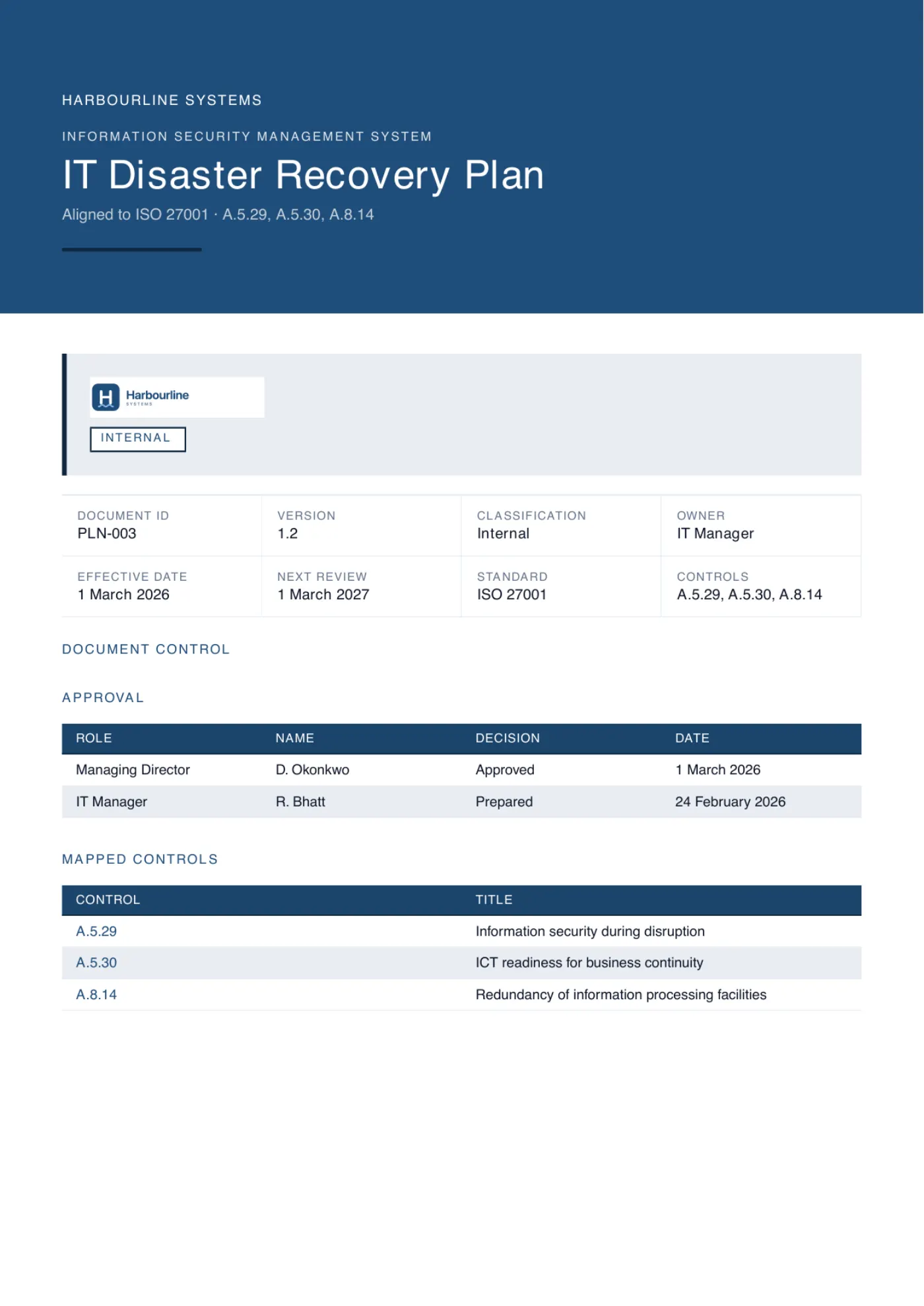
The cover page of a generated disaster recovery plan, branded for an example company, showing its document control block, approval table and the ISO controls it maps to.
Generated from this page's structure, in an example company's branding

Free template

Free disaster recovery plan template and example

The complete disaster recovery plan, free to copy from this page or download as an editable Word document. No sign-up. Replace every [bracketed placeholder] with your own details, delete anything that does not apply, and have it approved before you rely on it. The guide below explains what each section has to contain and what an auditor checks.

Free template, full text Download Word (.docx)

IT Disaster Recovery Plan - Template

An editable disaster recovery plan for your systems and data. Replace the bracketed placeholders with your own details.

[Organization] runs on a set of systems, data and infrastructure that have to come back, in the right order and in a known-good state, after an outage, a cyber attack or the loss of a site. This plan records which systems they are, how fast each has to be back and how much data we can afford to lose, who declares a disaster, and how each system is restored, checked and handed back.

1. Purpose, scope and related plans

This plan covers the recovery of [Organization]'s information systems, data, networks and supporting infrastructure after a disruption. It applies to [sites, data centers, cloud accounts and teams in scope] and to the systems listed in section 2. It excludes [anything out of scope, for example systems run entirely by a customer].

It is one of three linked documents. The Business Continuity Plan sets which business activities must keep running and the recovery objectives the business needs; this plan restores the technology those activities depend on. The Incident Response Plan governs the detection, containment and investigation of a security incident; where an incident becomes a disaster, both plans run together and this plan does not restore any system the incident lead has not released.

2. System inventory and recovery tiers

Every system in scope is assigned a recovery tier. The tier sets the order of recovery and the level of protection the system receives. Anything not listed here is recovered after all listed systems, on a best-effort basis.

TierWhat it meansSystems in this tier
Tier 1Critical: a business activity stops without it. Recovered first.[for example the customer platform, payments, the customer database]
Tier 2Important: work is degraded without it. Recovered once Tier 1 is confirmed.[for example email, the CRM, the service desk]
Tier 3Deferrable: can wait until normal operations resume.[for example the intranet, reporting, archives]
FoundationInfrastructure every tier needs first: identity, network, DNS, backup platform.[Directory service], [firewall and network], [DNS], [backup platform]

3. Recovery objectives per system

Each system carries two targets. The recovery time objective (RTO) is the maximum time it may be unavailable. The recovery point objective (RPO) is the maximum amount of recent data we can afford to lose, measured back from the moment of failure. The targets are taken from the Business Continuity Plan. Where a system supports more than one critical activity, it takes the shortest RTO and RPO of any of them.

SystemTierRTORPOSystem ownerDepends on
[System][1][4 hours][15 minutes][Role][Directory service], [database], [supplier]
[System][1][8 hours][1 hour][Role][Network], [cloud region]
[System][2][1 business day][4 hours][Role][System above]
[System][3][5 business days][24 hours][Role][Backup platform]

4. Roles and responsibilities

Every role has a named alternate. Contact details for all of them are held in [location], in a form still readable when [Organization]'s own systems, email and directory are unavailable.

RoleResponsibilities during recoveryPrimaryAlternate
DR coordinatorDeclares a disaster, sets recovery priorities, keeps the decision log, reports to [management role].[Name or role][Name or role]
Technical recovery teamRestores foundation infrastructure, then systems in tier order, following the runbooks in section 8.[Names or roles][Names or roles]
System ownersConfirm each restored system and its data are correct and usable before it is handed back.[Role per system][Role per system]
Communications leadEvery update to staff, customers and outside parties, on the schedule in section 11.[Name or role][Name or role]
Supplier liaisonOpens and chases cases with the suppliers and cloud providers in section 10.[Name or role][Name or role]

5. Invocation: declaring a disaster

Any suspected disaster is reported to [role or channel]. The DR coordinator decides whether to invoke this plan; if they cannot be reached within [30 minutes], [alternate role] decides instead. The decision, the time and the reason are recorded in the decision log, including a decision not to invoke.

Not every outage is a disaster. The plan is invoked when any of the following is true, or is expected to become true:

  • A Tier 1 system is unavailable, or is expected to remain unavailable, for longer than [half its RTO].
  • A primary site, data center or cloud region is lost or inaccessible.
  • Data in a Tier 1 or Tier 2 system is corrupted, encrypted or destroyed and cannot be repaired in place.
  • The incident lead advises that systems must be rebuilt rather than cleaned.

6. Recovery strategies

Each tier is protected by a strategy able to meet its targets. The strategy for each system is recorded in its runbook.

  • Restore from backup: rebuild the system and restore data from the most recent good backup. The default for Tier 2 and Tier 3.
  • Redundancy: duplicate components within the primary site or cloud region (for example clustered servers, redundant network links or replicated storage) so a single failure does not stop the service.
  • Failover to a secondary site or cloud region: [warm standby, pilot light or replicated environment] at [location or region], able to take over [Tier 1 systems] within their RTO.
  • Supplier-provided recovery: for software-as-a-service systems, the provider's own recovery commitments, together with our own export or backup of the data where the provider's arrangements do not meet our RPO.
  • Where a system's strategy cannot meet its targets, the gap is recorded as a risk in the information security risk register, and either the strategy is funded or the targets are changed and re-approved.

7. Backup arrangements

Backups are the last line of recovery and are protected accordingly. At least one copy of every Tier 1 and Tier 2 backup is immutable or offline, held under credentials separate from the production environment, so that an attacker with administrator access to production cannot alter or delete it.

Data or systemFrequencyCopies and locationImmutable or offline copyRetentionRestore test
[Tier 1 system][Every 15 minutes][Primary region] and [secondary region][Yes - immutable storage][35 days][Quarterly]
[Tier 2 system][Daily][Primary region] and [offsite location][Yes - offline copy][90 days][Every six months]
[Tier 3 system][Weekly][Backup platform][Yes][1 year][Annually]
[Software-as-a-service data][Daily export][Location][Yes][Period][Every six months]

8. Recovery runbooks

[Role] maintains a runbook for every Tier 1 and Tier 2 system, stored at [location] with a copy reachable when our network is down. Each runbook follows the same structure:

  • The system, its tier, RTO, RPO, owner and the systems it depends on.
  • Prerequisites: the infrastructure, accounts, licenses and encryption keys that must be available first, and where each is held.
  • Step-by-step recovery, written for a competent administrator who has never touched this system.
  • Validation: the checks the system owner performs to confirm the data is complete and the system is usable.
  • Handback and rollback: how the system is returned to users, and what to do if recovery fails part way.
  • Last tested date, elapsed recovery time measured, and the runbook version.

9. Ransomware and cyber attack recovery

Recovering from an attack differs from recovering from a failure: the attacker may still be present, and the most recent backup may already contain their changes. In any recovery following a cyber attack:

  • No system is restored into an environment that has not been declared clean by [role, with the incident lead]. Rebuild into an isolated, known-good environment where there is any doubt.
  • The restore point is chosen as the most recent backup taken before the earliest evidence of compromise, not simply the most recent backup. Where that point is uncertain, restored systems are scanned before they are reconnected.
  • All privileged, service and administrator credentials are reset, and multi-factor authentication is re-enrolled for administrators, before restored systems are reconnected to the network.
  • Evidence required by the incident lead is preserved before systems are wiped or rebuilt.
  • Decisions about contacting law enforcement, insurers, regulators or the attacker are made by [role] under the Incident Response Plan, not by the technical recovery team.

10. Supplier and cloud provider dependencies

For every supplier or cloud provider a Tier 1 or Tier 2 system depends on, we record the recovery commitment in the contract, the out-of-hours support route, and our own fallback if they cannot meet our targets.

Supplier or providerSystems affectedContracted recovery commitmentSupport routeOur fallback
[Cloud provider][Systems][Commitment, or 'none in contract'][Portal, phone, account reference][Fail over to region], [restore from our own backup]
[Software-as-a-service provider][System][Commitment][Contact][Our data export], [manual process under the Business Continuity Plan]
[Managed service or network provider][Systems][Commitment][Contact][Secondary link or provider]

11. Communications during recovery

The communications lead issues updates to staff through [primary channel], with [out-of-band channel, for example SMS] as the fallback when our own systems are unavailable, at least every [2 hours] while a Tier 1 system is down. Customer and external messages follow the Business Continuity Plan and are approved by [role]. Every update gives the systems affected, what has been restored, and the time of the next update, with recovery estimates taken from the technical recovery team rather than from hope.

12. Return to normal operations and failback

A system is recovered when its owner has confirmed the data is complete and the system is usable, and the security controls in the runbook are back in place. [Organization] returns to normal operations when all Tier 1 and Tier 2 systems are recovered and the DR coordinator stands the plan down, recording the time and the reason.

Failback from a secondary site or cloud region is scheduled as a planned change, approved by [role], and is not started until a fresh backup has been taken at the recovery site. The recovery environment is kept available until the primary has run normally for [3 business days]. A post-recovery review is held within [10 business days], and its actions are recorded with an owner and a due date.

13. Testing and exercising

The plan is tested on the schedule below, after any significant change to systems, sites or suppliers, and after any real invocation. Each test records the date, scenario, participants, elapsed time measured against the RTO, what failed, and the actions raised, each with an owner and a due date.

  • Tabletop exercise, at least [annually]: the recovery team works through a realistic scenario, including a ransomware scenario, against this plan.
  • Restore test, at least [quarterly for Tier 1 and every six months for Tier 2]: a system and its data are restored from backup into an isolated environment, checked by the system owner, and timed.
  • Failover test, at least [annually] for each system with a failover strategy: service is moved to the secondary site or region and back.

14. Maintenance and document control

This plan is reviewed at least annually and after any test, invocation or significant change. At each review the system inventory, tiers, recovery objectives, runbook links, supplier details and contact details are re-validated against the current environment.

Owned by [role]. Approved by [name], [title], on [date]. Version [x.x]. Next review [date]. The current copy is stored at [location], with an offline or out-of-band copy at [location] that remains reachable when [Organization]'s systems are down.

A solid starting point, but it is one document. ISO 27001 expects ICT readiness to hold together with the rest of your management system: the recovery objectives your business continuity arrangements set, the risks it treats, the suppliers behind it, and the Statement of Applicability that records the decision. PolicyMint generates that full set, written for your business and checked before you see it.
The guide

How to write a disaster recovery plan

14
sections
4
with real wording
7
auditor requests
7
failure modes

A disaster recovery plan is about technology, not about the business activities that run on it: which systems come back, in what order, from which backups, by whose hands, and how you prove each one is right before users return. Before section 1, list every system you run and what it depends on, including the unglamorous ones - identity, DNS, the firewall, the backup platform - because nothing else restores until they do. Here is every section in order, what each has to contain and what an assessor is checking when they read it. Four of them carry an example clause, because those four are the ones people get wrong.

  1. Purpose, scope and related plans

    What it must contain

    The sites, data centers, cloud accounts and teams the plan covers, what it excludes, and one short paragraph on how it relates to the continuity plan and the incident response plan: the continuity plan sets what the business needs back, this plan restores the technology, and the incident plan decides when a compromised system may be touched.

    What the auditor checks

    Whether the scope matches your ISMS scope and your asset inventory, and whether the three plans hand over to each other or quietly overlap. Two plans that both claim to run the recovery is a contradiction they can find without testing anything.

  2. System inventory and recovery tiers

    What it must contain

    Every system in scope placed in a tier that sets its recovery order and its level of protection, plus a foundation tier for what everything else needs first: identity, network, DNS and the backup platform itself. Say what happens to anything not listed.

    What the auditor checks

    They compare the list against your asset inventory and pick a system that is missing from it. The foundation tier is the one people leave out, and it is the first thing a real recovery needs.

  3. Recovery objectives per system

    What it must contain

    An RTO and an RPO for every listed system, an owner, and what each system depends on. The numbers come from the business continuity arrangements, translated from activities into systems, not invented by IT to match the backup it already runs.

    What the auditor checks

    Where the numbers came from, and whether the recovery strategy and backup schedule for that system can genuinely meet them. A system with an RPO tighter than its backup frequency is arithmetic, not judgment.

    Wording that works
    Where a system supports more than one critical activity, it takes the shortest RTO and RPO of any of them.

    Activities and systems do not map one to one, and the translation is where targets quietly loosen. A shared database behind order taking and reporting inherits the order-taking numbers, not an average of the two. Writing the rule down stops each system owner from picking the target that suits the backup they already have.

  4. Roles and responsibilities

    What it must contain

    The DR coordinator who declares and runs the recovery, the technical recovery team, the system owners who sign off each restored system, the communications lead and whoever chases suppliers. Each with a named alternate, and contact details held somewhere readable without your own email or directory.

    What the auditor checks

    Whether the names are current and the alternates exist. They also look for the system owner role: a recovery signed off by the person who ran the restore has no independent check on whether the data is right.

  5. Invocation: declaring a disaster

    What it must contain

    Who a suspected disaster is reported to, who decides, how long before an alternate decides instead, and the criteria that turn an outage into a disaster: a Tier 1 system down past a threshold, a site or cloud region lost, data destroyed or encrypted, or advice that systems must be rebuilt.

    What the auditor checks

    Whether the criteria are specific enough that two people would reach the same decision, and whether decisions are logged, including the decision not to invoke.

  6. Recovery strategies

    What it must contain

    For each tier, how recovery actually happens: restore from backup, redundancy within the primary site or region, failover to a secondary site or cloud region, or the provider's own recovery for software-as-a-service. And what happens when a strategy cannot meet its target: fund it, or change the target and record the risk.

    What the auditor checks

    They pick a Tier 1 system and ask how it comes back if its whole site or region is gone. Redundancy inside one region answers a server failure, not a regional outage, and they will ask which one you planned for.

  7. Backup arrangements

    What it must contain

    Per system or data set: frequency, where the copies live, whether one of them is immutable or offline, how long they are kept and how often a restore is tested. Include software-as-a-service data, which is often assumed to be backed up by the provider.

    What the auditor checks

    A dated restore test for a system they choose, with the elapsed time, and proof that at least one copy sits out of reach of a compromised administrator account.

    Wording that works
    At least one copy of every Tier 1 and Tier 2 backup is immutable or offline, held under credentials separate from the production environment, so that an attacker with administrator access to production cannot alter or delete it.

    An attacker who reaches your domain administrator account usually reaches the backup console too, and deleting backups before encrypting production is a commonly reported step in ransomware attacks. Immutable or offline is the what; separate credentials is the part people forget, and it is what makes the copy unreachable in practice rather than on paper.

  8. Recovery runbooks

    What it must contain

    A runbook per Tier 1 and Tier 2 system in one fixed structure: targets and dependencies, prerequisites such as accounts, licenses and encryption keys, the recovery steps, the validation checks, handback and rollback, and the last test result. Stored where it can be read with the network down.

    What the auditor checks

    They ask for one runbook and who last followed it. A runbook only its author can follow, or one stored on the system it restores, reads as no runbook.

  9. Ransomware and cyber attack recovery

    What it must contain

    What changes when the cause is an attacker: restore only into an environment declared clean, choose the restore point from the earliest evidence of compromise rather than the newest backup, reset privileged and service credentials before reconnecting, preserve evidence, and leave decisions about law enforcement, insurers, regulators and the attacker to the incident process.

    What the auditor checks

    Who declares the environment clean, and how the plan and the incident response plan hand over. A recovery that starts before the incident lead has released the systems restores the attacker along with the data.

    Wording that works
    No system is restored into an environment that has not been declared clean by [role, with the incident lead]. Rebuild into an isolated, known-good environment where there is any doubt.

    The pressure in a ransomware recovery is all toward speed, and restoring straight back onto the infrastructure the attacker used is the fastest option. This line puts a named decision in front of it. The two bullets that follow in the template do the rest: a restore point chosen from the earliest evidence of compromise, and every privileged credential reset before anything is reconnected.

  10. Supplier and cloud provider dependencies

    What it must contain

    For each supplier behind a Tier 1 or Tier 2 system: the recovery commitment actually in the contract (or a note that there is none), the out-of-hours support route, and your own fallback if they cannot meet your targets.

    What the auditor checks

    They cross-read this against the contracts and your supplier register. A cloud provider's shared responsibility model usually leaves backup of your own data and configuration with you, and a plan that assumes otherwise is a finding.

  11. Communications during recovery

    What it must contain

    Who updates staff, through which channel, how often, and the fallback when your own systems are the thing that is down. Customer and public messages defer to the continuity plan; this section keeps the recovery team's estimates flowing to whoever speaks for the business.

    What the auditor checks

    That the fallback channel does not run on the failed infrastructure, and that estimates come from the recovery team rather than from someone guessing.

  12. Return to normal operations and failback

    What it must contain

    What recovered means (the owner has checked the data and the system is usable, and its security controls are back), who stands the plan down, how failback from a secondary site or region is run, how long the recovery environment is kept, and when the post-recovery review happens.

    What the auditor checks

    The stand-down record and the review actions, closed. They also ask what was relaxed during recovery, such as temporary accounts or disabled logging, and when it went back.

    Wording that works
    Failback from a secondary site or cloud region is scheduled as a planned change, approved by [role], and is not started until a fresh backup has been taken at the recovery site.

    Everything written while running at the recovery site exists only there. Failing back in a hurry, without a backup of that environment, is how data survives the disaster and is then lost on the way home. Treating failback as a planned change also means it is scheduled for a quiet window, not the first evening things look stable.

  13. Testing and exercising

    What it must contain

    Three kinds of test on a stated cycle: a tabletop that includes a ransomware scenario, restore tests timed against the RTO and checked by the system owner, and a failover test for every system that relies on one. Plus the triggers that beat the calendar, and what each test records.

    What the auditor checks

    The last restore test for a system they choose, with its elapsed time against the RTO, and the actions it raised, closed. A test program that has only ever been a tabletop has never measured a recovery time.

  14. Maintenance and document control

    What it must contain

    The review cycle and triggers, what is re-validated at each review (inventory, tiers, objectives, runbooks, suppliers, contacts), then the owner, approver, approval date, version, next review date and where the current copy and its offline copy live.

    What the auditor checks

    The approval record, and whether the system list still matches today's environment. A plan that still lists a system you migrated away from last year tells them nobody has reviewed it.

Two neighboring documents do jobs this plan deliberately leaves alone. The business continuity plan template covers keeping your business activities running while the technology is down, and it is where the recovery targets this plan has to meet are set. The incident response plan template covers detecting, containing and investigating a security incident, which runs before and alongside any recovery that follows an attack.

One job sits outside the section list and is worth more than any sentence inside it: restore something. A plan whose backups have never been restored, timed and checked by the system owner is a description of what you hope will happen, and every other piece of your evidence is weighed on that basis.

Get it written for your organization - your first document is free Card required; no charge today.

Evidence, not wording

What an auditor actually checks

Assessors rarely comment on how a recovery plan is written. They pick a system and follow it off the page: into the backup configuration, the last restore record, the supplier contract and the continuity plan the targets came from. Answer these about your own draft before somebody else does.

Show me the current plan, and where you would read it with the network down.

Satisfies A version number, an owner, a dated approval, and a copy held somewhere that does not depend on your own systems, which you can point to on the day.

Fails A plan whose only copy sits on the file server or intranet it exists to recover.

Pick a Tier 1 system. When was it last restored, and how long did it take?

Satisfies A dated restore test record with the elapsed time, the system owner's confirmation that the data was complete and usable, and the result compared with that system's RTO.

Fails A backup job report showing successful backups, with no restore, no timing and no check of the restored data.

Where did these RTOs and RPOs come from?

Satisfies The business continuity arrangements or impact analysis the numbers were taken from, and a record of who agreed them, so each system's targets trace back to a business need.

Fails Targets set by IT to match the backup schedule already in place, which no one outside IT has seen.

If an attacker had your administrator credentials, could they delete your backups?

Satisfies An immutable or offline copy for the systems that matter, held under separate credentials, and evidence that its configuration has been checked, not just purchased.

Fails Every backup copy reachable from the same domain administrator account that runs production.

What does your cloud provider commit to, and what is left to you?

Satisfies The contracted recovery commitments for each provider behind a critical system, and your own backup or export of the data where those commitments do not meet your RPO.

Fails An assumption that the provider backs up your data and configuration, with nothing in the contract to say so.

When did you last test a failover, and what failed?

Satisfies A test record with the date, the scenario, who took part, what went wrong, and the actions raised, each with an owner and a due date and later closed, and the plan reissued at a new version.

Fails A test report on which everything passed, with no actions and no change to the plan.

Does this plan agree with your other documents?

Satisfies The same systems as your asset inventory, the same suppliers as your supplier register, the same retention as your backup configuration, and the same recovery targets as your continuity plan.

Fails A continuity plan promising four-hour recovery for an activity whose system this plan puts in Tier 3.

Notice how little of that is about the document itself. A recovery plan is judged by its records - restores, failovers, test actions closed - and a well-written plan with no records behind it answers none of these questions.

Failure modes

Where disaster recovery plans fall over

Recovery plans rarely fail because a section is missing. They fail on assumptions nobody tested, and every one of these is visible in a draft long before a real outage finds it. Read your own against the list.

  • Backups that were never restored

    Green backup reports for years and no record of a single restore. A backup that has never been restored is an assumption: the job can succeed while the data is incomplete, the encryption key is missing or the restore takes far longer than the RTO allows.

  • Every copy reachable from production

    Backups on a share the domain administrator can delete, or replicated to a second region under the same account. Replication copies corruption and encryption as faithfully as it copies data. Keep one copy immutable or offline, under separate credentials.

  • Restoring into the attacker's environment

    Rebuilding servers from backup onto the same network, with the same administrator passwords, before anyone has confirmed how the attacker got in. The restored systems are compromised again before the first user logs back in.

  • Forgetting the foundation

    Runbooks for the finance system and the CRM, and nothing for identity, DNS, the firewall or the backup platform itself. Nothing else can be restored until those are, and they are the systems least often written down.

  • Recovery objectives nobody outside IT agreed

    RTOs and RPOs chosen because the current backup schedule already meets them. The plan then passes its own tests and fails the business, because the numbers were never checked against what the business actually needs back and how fast.

  • Assuming the cloud provider has it

    No backup of software-as-a-service data or cloud configuration, on the belief that the provider keeps one. Providers typically protect their own infrastructure; deleted or encrypted customer data and misconfiguration are often left to the customer. Read the contract and back up what it does not cover.

  • The plan lives on the systems it recovers

    Runbooks on the wiki, contact lists in the directory, the plan itself on the file server. When those are down the recovery team starts from memory. Keep a current copy, including contacts, somewhere that does not depend on your own infrastructure.

From template to audit-ready

Where disaster recovery fits in ISO 27001

ISO 27001 does not ask for a document called a disaster recovery plan. What it has is a set of Annex A controls, and the one this document most directly evidences is A.5.30, ICT readiness for business continuity. The practical question it puts to you is whether the systems and data your business depends on can genuinely be recovered within the targets your continuity arrangements set - and whether you can show it, with a named owner for each recovery arrangement, a runbook they keep current, and a dated test that proves the timing rather than assuming it. ControlStack, our sibling site, has a control-level walkthrough of A.5.30.

Three more controls sit close behind it. A.8.13, information backup, is where the backup table and the restore tests are read. A.8.14, redundancy of information processing facilities, is where the redundancy and failover strategies are. And A.5.29, information security during disruption, asks whether your security controls survive the recovery itself: temporary accounts, relaxed logging and rebuilt servers all have to meet the same standard as the systems they replace.

This is where a standalone plan starts to creak. An auditor reads it against your continuity plan, your asset inventory, your supplier records, your backup configuration and your Statement of Applicability, and expects them to agree. A recovery target the backup schedule cannot meet is a finding, however well the plan is written.

See the full ISO 27001 documentation set a certifiable management system includes, or size the remaining work first with an ISO 27001 gap analysis.

See the real output

What PolicyMint generates

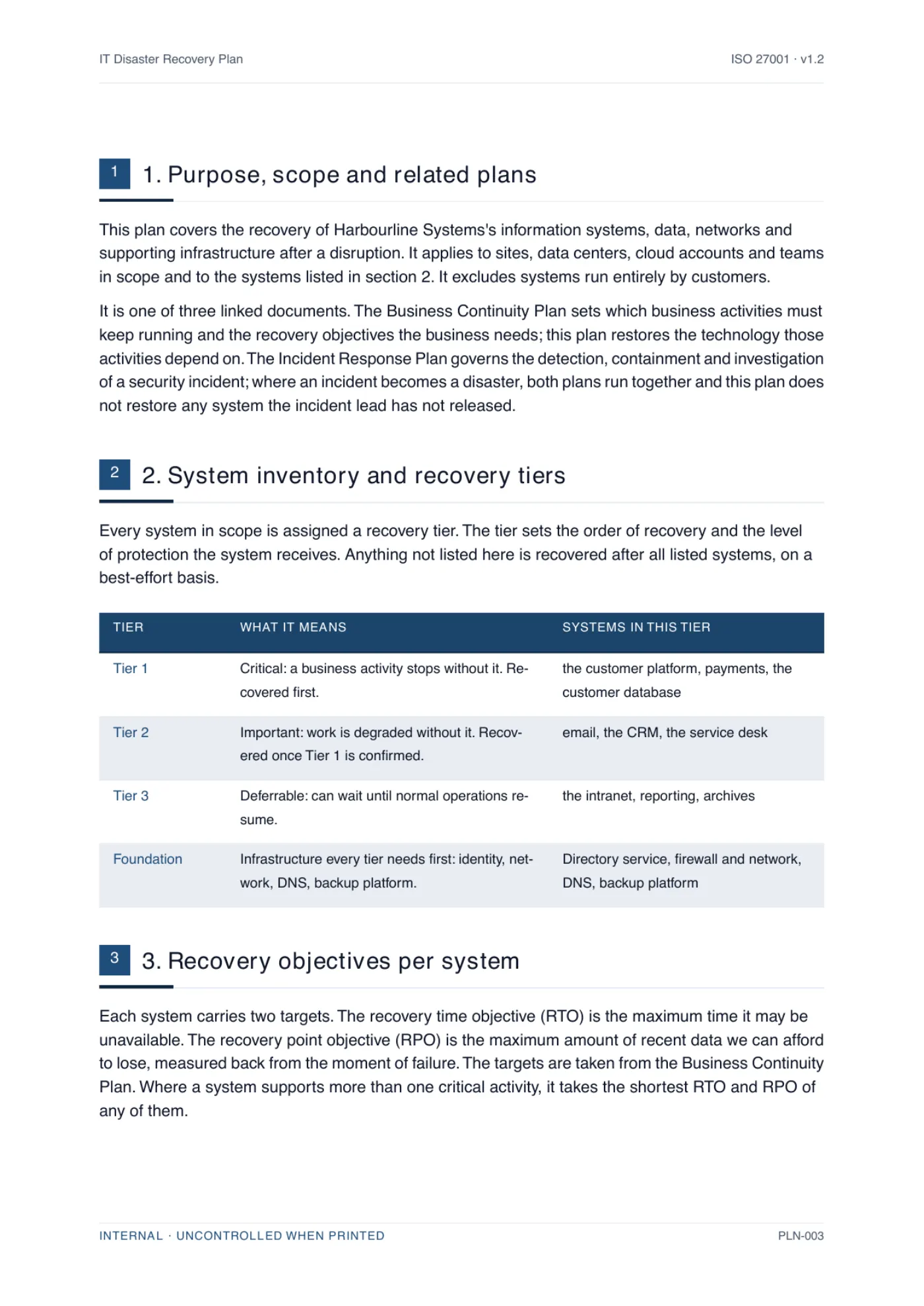
PolicyMint writes this as an ICT Continuity and Disaster Recovery Plan. It comes back with your own critical systems listed in recovery-priority order with an RTO, an RPO and their dependencies beside each, a recovery team table with a named alternate for every role, the activation decision and recovery sequence drawn as diagrams, and a section on keeping security controls in force during recovery - written against the systems, suppliers and roles you told us you run, with the square brackets resolved rather than left for you to fill. The cover in the hero and the body page below are this document generated for an example company, in that company's branding, shown exactly as PolicyMint renders it.

A body page of a generated disaster recovery plan, showing numbered clauses written for a specific business with the placeholders resolved.
One page of the generated document, for an example company. The trial produces the whole document, not a sample.

Where the guide says [role] or [system], the document says yours; where PolicyMint cannot know a fact, it asks rather than guesses.

The PolicyMint guided review: a generated scope statement with one highlighted sentence that needs the reader's input, and beside it a review panel explaining what is needed, a field to answer it, and the choice between having the answer written in or inserted exactly as typed.

The one fact this document could not know stays highlighted in the document and the export. The review explains what is needed and writes your answer in. Nothing is invented. Fictional demo data.

Side by side

Writing it yourself vs generating it

Both columns end with the same document in your hands. The difference is who settles the decisions inside it, and what is left over for you to maintain afterward.

Dimension Writing it yourself Generating it with PolicyMint
What you end up with One disaster recovery plan, filled in from the free template and guide above, as good as the hours you can give it An ICT Continuity and Disaster Recovery Plan written from your business profile and ready to circulate
Time to a usable draft A day or two of writing, after the system inventory and recovery targets are agreed Answer a profile once and the draft comes back with systems, targets and roles already in place
Blanks left in it Every [system], [RTO], [role] and backup schedule is yours to settle, fill and keep current Filled from your profile, so no bracketed placeholder survives into the document
Tailored to your business Only as far as you rewrite it - a generic template knows nothing about your systems Written from the systems, suppliers, sites and recovery targets you describe
Mapped to ISO 27001 On you to work out which control each section answers Each section cites what it satisfies, starting with A.5.30
Checked before you use it Your own read-through, or an hour of a consultant's time Three independent verifiers on a different AI model, plus a repair pass
Agrees with your other documents On you - separately written plans drift on systems, targets and roles One profile drives everything you generate, so the continuity plan and this one match
Branding and formats Whatever your word processor gives you Your logo and colors, exported to Word, PDF and Excel
Price Free, plus the hours - and every section is yours to maintain A$10.00US$6.50£5.00€6.00 for this document, and your first one is free
ISO 27001 documents

36

ISO 27001 documents

tiered by what you actually need

ISO 42001 documents

21

ISO 42001 documents

for AI management systems

Clauses and controls mapped

182

Clauses and controls mapped

every document cites the ones it satisfies

Verifiers per section

3

Verifiers per section

on a different model to the writer

Disaster recovery plan FAQ

The questions people ask

Including how it differs from a business continuity plan.

Is this disaster recovery plan template free to download?

Yes. The complete template is on this page and as an editable Word document, with no sign-up and no card. Replace the bracketed placeholders, delete what does not apply, and have it approved before you rely on it. If you would rather have it written for your organization, with your systems, recovery targets and roles filled in, PolicyMint generates it and your first document is free; we ask for a card only when you download that one, and it is not charged.

What is the difference between a disaster recovery plan and a business continuity plan?

A business continuity plan is about the business: which activities must keep running, how people work around a failure, and how fast each activity has to be back. A disaster recovery plan is about the technology those activities depend on: which systems and data are restored, in what order, from what backups, by whom, and how you prove it worked. The continuity plan sets the recovery targets; the disaster recovery plan is how IT meets them. Most organizations need both, and they should agree with each other.

What should an IT disaster recovery plan include?

At minimum: the systems in scope grouped into recovery tiers, an RTO and RPO for each, named recovery roles with alternates, clear criteria for declaring a disaster, the recovery strategy for each tier, backup arrangements including an immutable or offline copy, a runbook per critical system, a section on recovering from ransomware or another cyber attack, supplier and cloud dependencies, communications, failback, a testing schedule and document control. The template above has all fourteen sections in that order.

Does ISO 27001 require a disaster recovery plan?

ISO 27001 does not require a document with that exact name. Annex A control A.5.30, ICT readiness for business continuity, asks that ICT readiness be planned, implemented, maintained and tested against your business continuity objectives, and a disaster recovery plan is the usual way to show that. A.8.13, information backup, and A.8.14, redundancy of information processing facilities, cover the backups and redundancy it relies on. Whether those controls apply to you is recorded in your Statement of Applicability, and the plan on its own is not the whole of the evidence: restore and failover test records matter as much as the document.

How much does a full ISO 27001 document set cost?

PolicyMint's Full ISMS / AIMS pack is a one-time A$350US$229£179€209 including GST and covers a complete certifiable ISO 27001 set of 36 finished documents, or a complete ISO 42001 set of 21. Each document is drafted from your own business profile, checked by three independent verifiers before you see it, and exported in your branding as Word, PDF and Excel. There is no subscription and credits are valid for 18 months. That is about A$8.75US$5.73£4.48€5.23 per finished document. For comparison, Advisera publicly lists about A$1,300 (US$897)US$897about £660 (US$897)about €780 (US$897) one-time for pre-written templates you complete with its AI copilot, and GRC Solutions (formerly IT Governance) about A$950 (£495)about US$670 (£495)£495about €580 (£495) excl. VAT. Certification itself is a separate cost, paid to an auditor and a certification body.

Ready when you are

Stop staring at an empty document set

Set up your business once. Get the documents you actually need, written for how you really operate, in your branding, checked before you see them.

Your first document is on us. We ask for a card when you download it and you are not charged for it, and there is no sales call.